Dashboard and reports

See the quality of every release at a glance.

Before every release your product owner asks the same thing: are we good to go. The JOSF dashboard answers it without a spreadsheet. Every run gets a report you can print, share or send to TestMonitor.

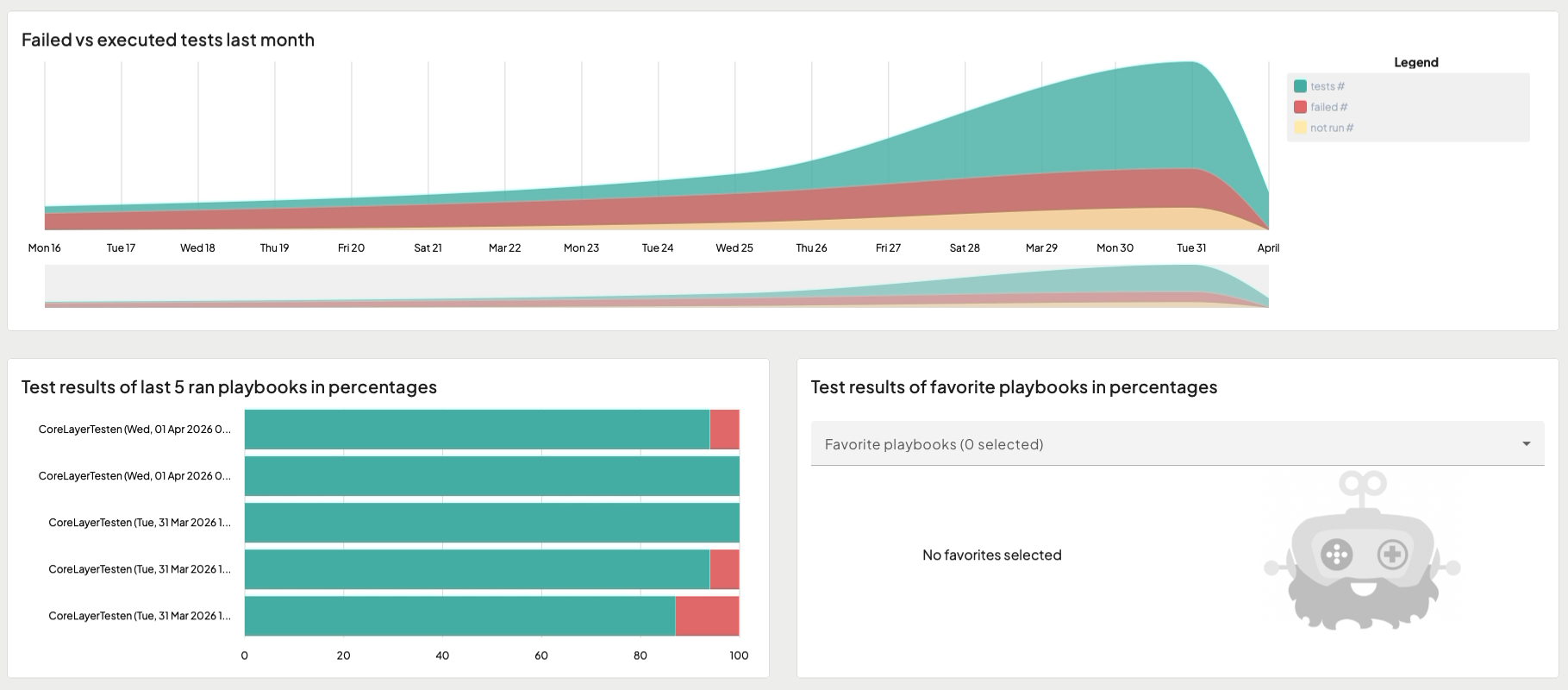
The JOSF dashboard: failed versus executed tests last month and the results of the last five playbook runs

Playbooks: your tests, bundled and scheduled

  • Bundle test cases in playlists and playlists in a playbook: smoke, regression, release.
  • Filter playlists with tags and AND or OR, so one playbook follows your tags automatically.
  • Run in parallel. You set the maximum per playlist.
  • Re-run only the tests that failed in the last run.
  • Start a playbook from JOSF or from your pipeline with the JOSF CLI.

The dashboard

  • Failed versus executed tests over the last month, as a trend line.
  • Results of the last five playbook runs in percentages: passed, failed, skipped.
  • Your favorite playbooks side by side. Pick the ones that matter for this release.

A report per run

  • Start time, end time, duration and environment.
  • Every test case with its steps, result and screenshots.
  • The variables used in the scenario, so you can reproduce a failure.
  • Execution times per test in a chart. Spot the slow ones before they slow you down.
  • Export to a printable report. Choose what to show and hide the details management does not need. Print it to PDF.
Playbook run: Regression acceptance4 steps · 1 failed
⋮⋮UI
Login and navigation12 tests
38 s
⋮⋮API
Orders API24 tests
21 s
⋮⋮UI
Checkout screens18 tests, 1 failed
2 m 04 s
⋮⋮DB
Data checks6 tests
4 s

Results where your team works

  • Send a run to TestMonitor with one click, attachments included.
  • Publish the JUnit XML from your pipeline.
  • Accessibility runs get their own report, with findings and advice per rule.

Keep the project healthy

  • The project analysis finds unused page objects, steps and test cases. Clean them up in bulk.
  • Tag tests and playbooks, and filter playlists with AND and OR.

Frequently asked questions

Can I share results with people who do not use JOSF?

Yes. Print the report to PDF or send the run to TestMonitor.

Does the dashboard cover more than one project?

The dashboard shows the project you have open. For an overview across teams and projects, use TestMonitor.

Do I get the raw data?

Yes. Every run is stored as a file in your project, and the CLI writes JUnit XML and a JSON report.

Start today