

JOSF 26 is a desktop app for Windows and Mac. Installing takes a few minutes and Java is included. On a Mac there is one extra choice: the version that fits your chip.
Install JOSF on Windows
- Go to the download page, enter your details and click Download for Windows.
- Open JOSF-Setup-26.0.0.exe and follow the steps.
- Open JOSF and log in.
Install JOSF on Mac
There are two Mac versions. First check which one you need:
- Click the Apple menu in the top-left corner of your screen.
- Choose About This Mac.
- Look at the line that says Chip or Processor.
| What you see | Click on the download page |
|---|---|
| Chip: Apple M1, M2, M3 or newer | Download for Mac (Apple silicon) |
| Processor: something with Intel | Download for Mac (Intel) |
Then install JOSF:
- Go to the download page and click the version from the table.
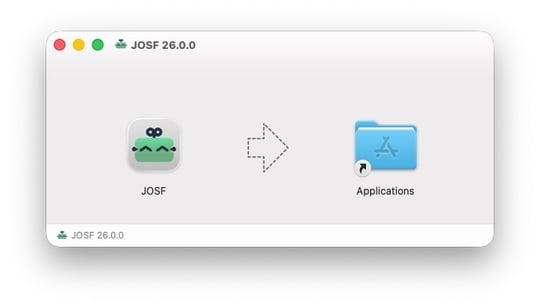
- Open the .dmg file and drag JOSF to your Applications folder.
- Open JOSF from your Applications folder and log in.
Log in
Open JOSF and log in with your email address. You receive a six-digit code in your mailbox. Your account opens every project in your workspace.
Staying up to date
JOSF tells you when a new version is available and installs it when you choose. That way your whole team runs the same version.
Frequently asked questions
Do I need to install Java?
Java is included in the installer, so you can start right away.
I installed the wrong Mac version. What now?
The Intel version usually still opens on a Mac with Apple silicon, but macOS has to translate it while it runs. That makes JOSF noticeably slower. An Intel Mac runs only the Intel version. In both cases: remove JOSF from your Applications folder, download the right version and install it again.
Does JOSF run on Linux?
The desktop app is for Windows and Mac. For Linux servers and pipelines there is the server package, and a Docker image on request.
I run JOSF in a pipeline. Do I need the desktop app?
Pipelines and build servers use the server package. You find it on the same download page.
What happens to my license file?
Your license file keeps working until your organization moves to the license portal. We roll out accounts and the portal in phases. Machines without internet can always upload a license file.
Still stuck? Contact us and we will help you get JOSF running.

Release of JOSF 3.2.0

Release of JOSF 3.1.0
